Product events, on your terms
You already have a data science expert.
Your coding agent.
Slurp collects events and user feedback in your own Cloudflare account. slurp sync pulls them to your laptop (or an external SSD) as a DuckDB file. Your agent analyzes them with SQL, finds what to fix and ships the change.
events + feedback→DuckDB→your agent→a better product
$ slurp syncCloudflare archives.
A local DuckDB file.
Ready for your agent.
Monthly USD · 50M events
50 million events.
About $8 a month.*
- Slurp$7.96Estimated bill for your own Cloudflare account
- OpenPanel Cloud$900Managed analytics
- PostHog$1,528.40Managed product analytics
*List-price estimate: 20 events per request, 12 months of archives kept, no Slurp fee. You pay Cloudflare directly. Assumptions, plus 1B and 10B events →
Instrument once. Ask better questions.
Keep your existing coding agent. Give it what your users do and say, and let it act on it.
1. Collect
Your agent adds events as it builds the feature, and your app sends what users say the same way. JavaScript SDK, or plain HTTP from any language.
track('feedback', { message });2. Pull
Events and feedback wait in your Cloudflare account, even while your laptop is off. One command brings the new ones to your laptop or an external SSD.
slurp sync3. Analyze
Your agent queries the local DuckDB file, finds the pattern behind the numbers and writes the report.
slurp sql 'SELECT …'4. Act
Your agent fixes what it found. Give any bot (Claude Code, Codex, Grok, a Slack bot) its own revocable read key and it can sync and query the same data.
slurp source key createWhat your agent hands back.
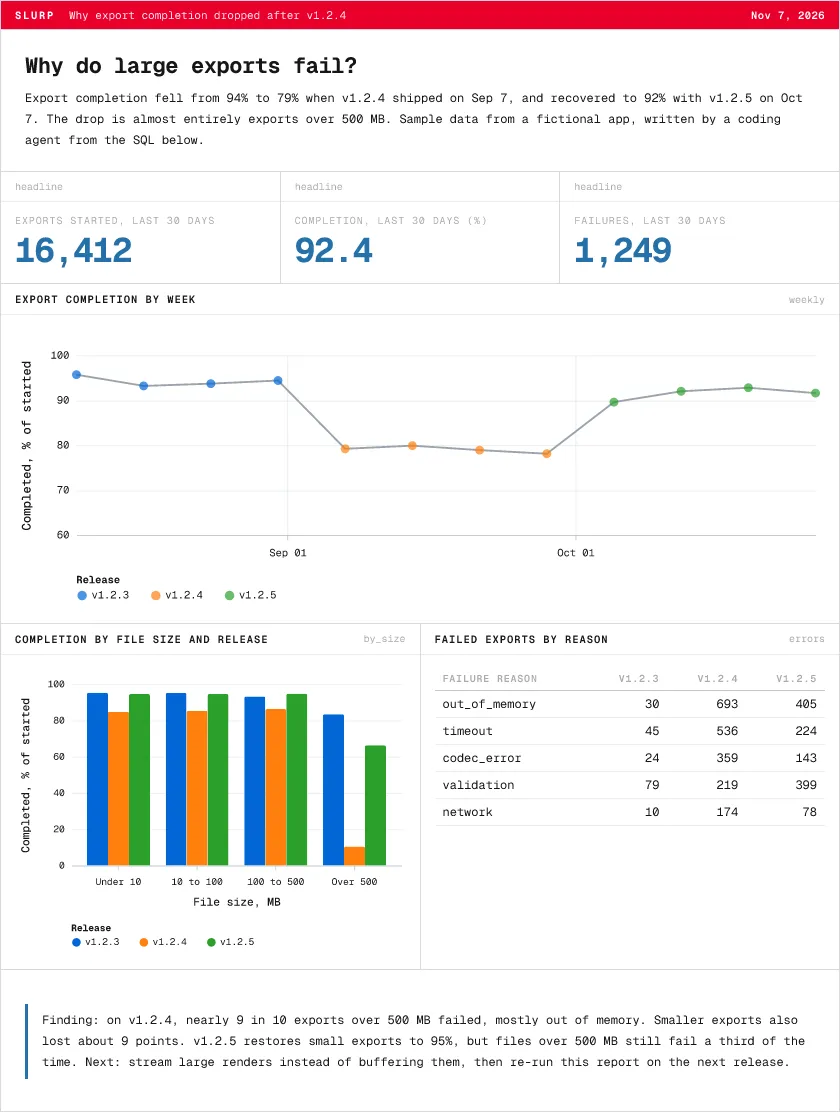
Real reports built by Slurp from sample data, through the same pipeline you would use: line and bar charts, heatmaps, donuts, scatter plots, funnels and areas, in any Perspective theme, with retention, funnels, visits and next-step paths from DuckDB's behavioral functions. Open one: each is an ordinary self-contained HTML file.
Why export completion droppedLine, grouped bars, table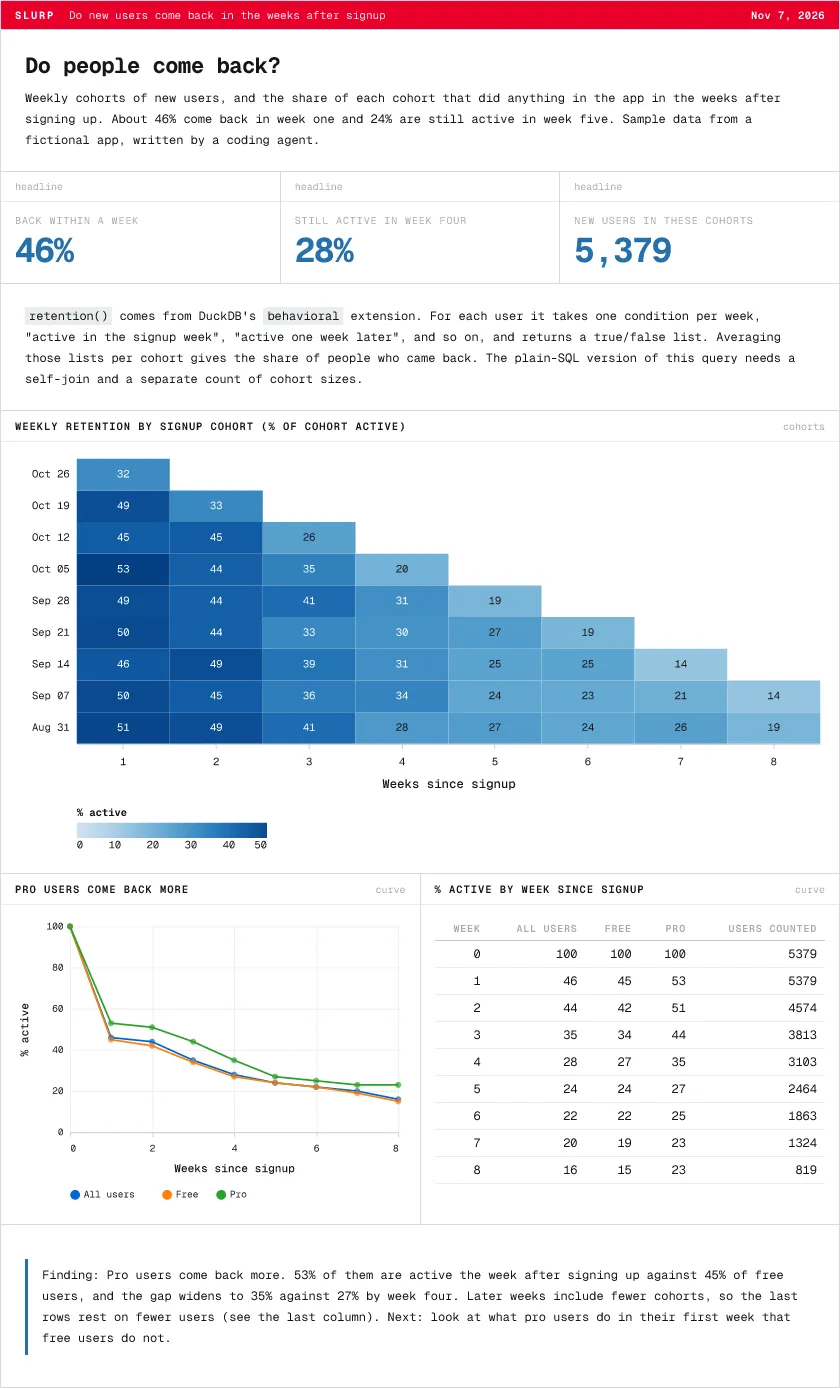 Do new users come back?Cohort heatmap, retention curves
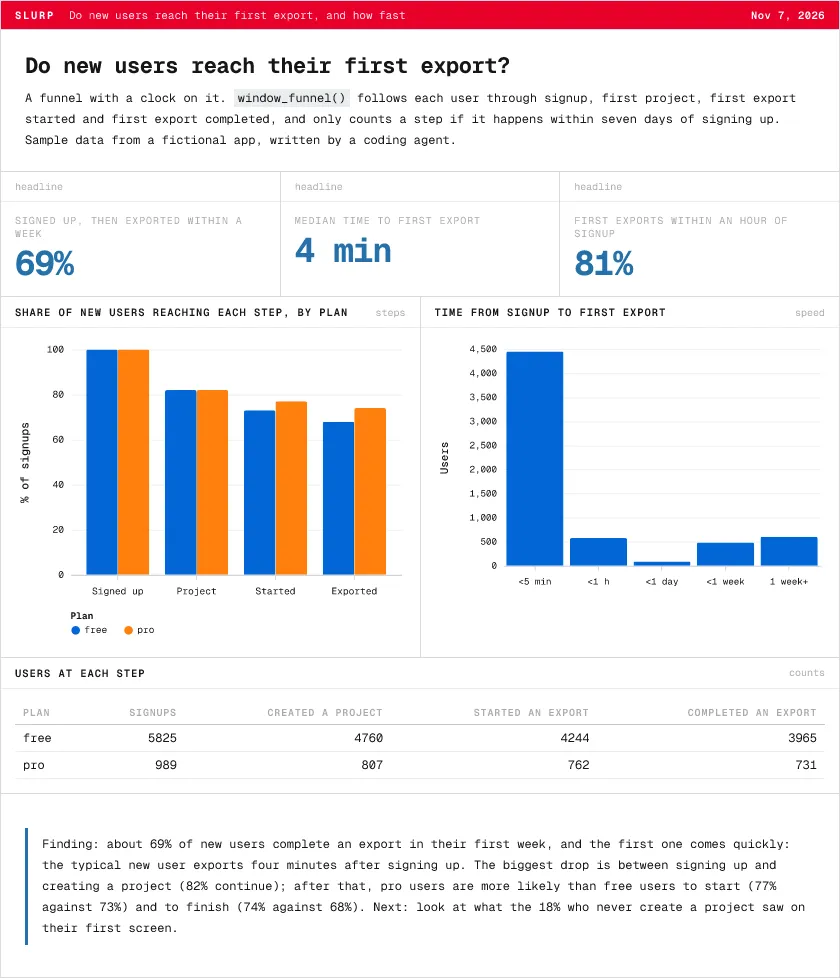 How fast do new users get value?window_funnel, bars
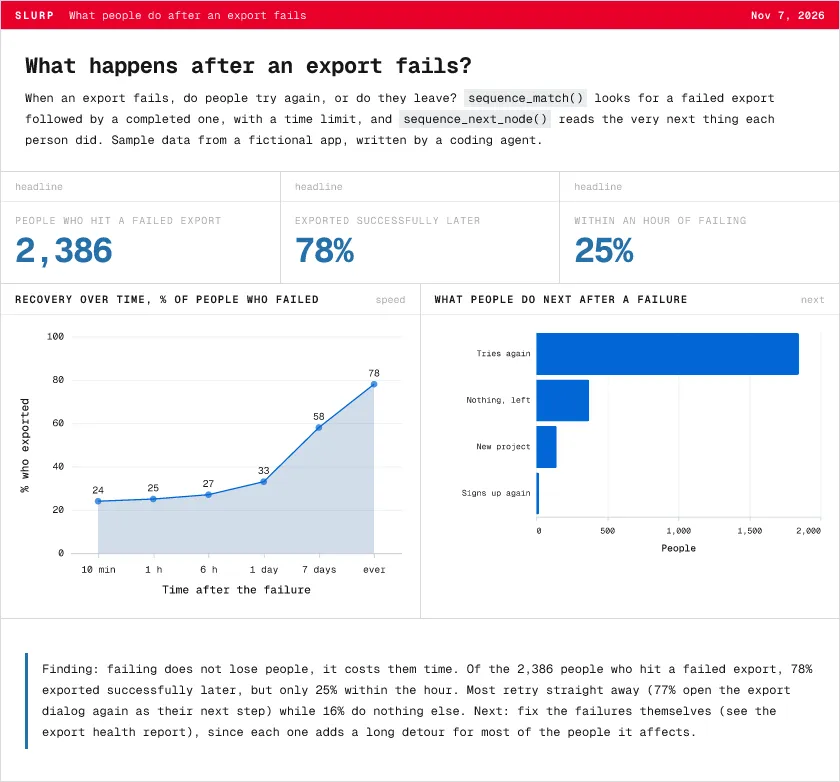 What happens after a failure?sequence_match, next step
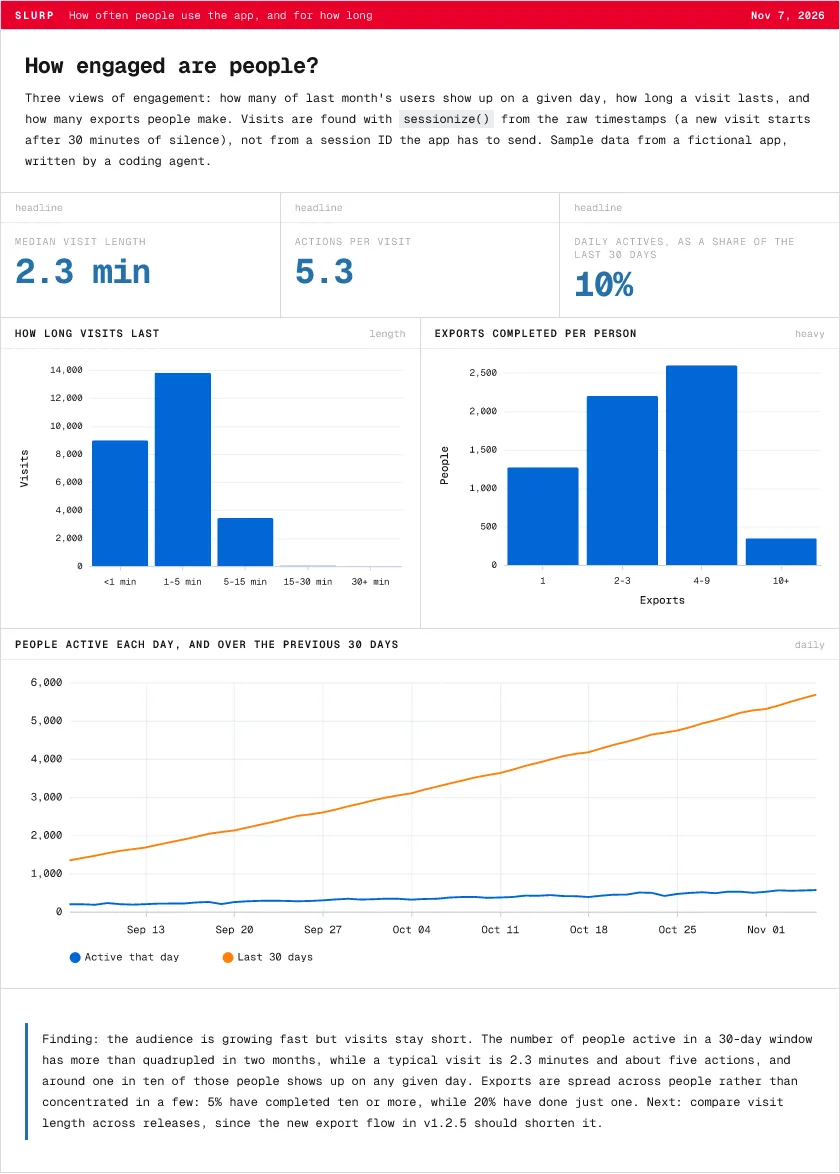 How engaged are people?sessionize, lines, bars
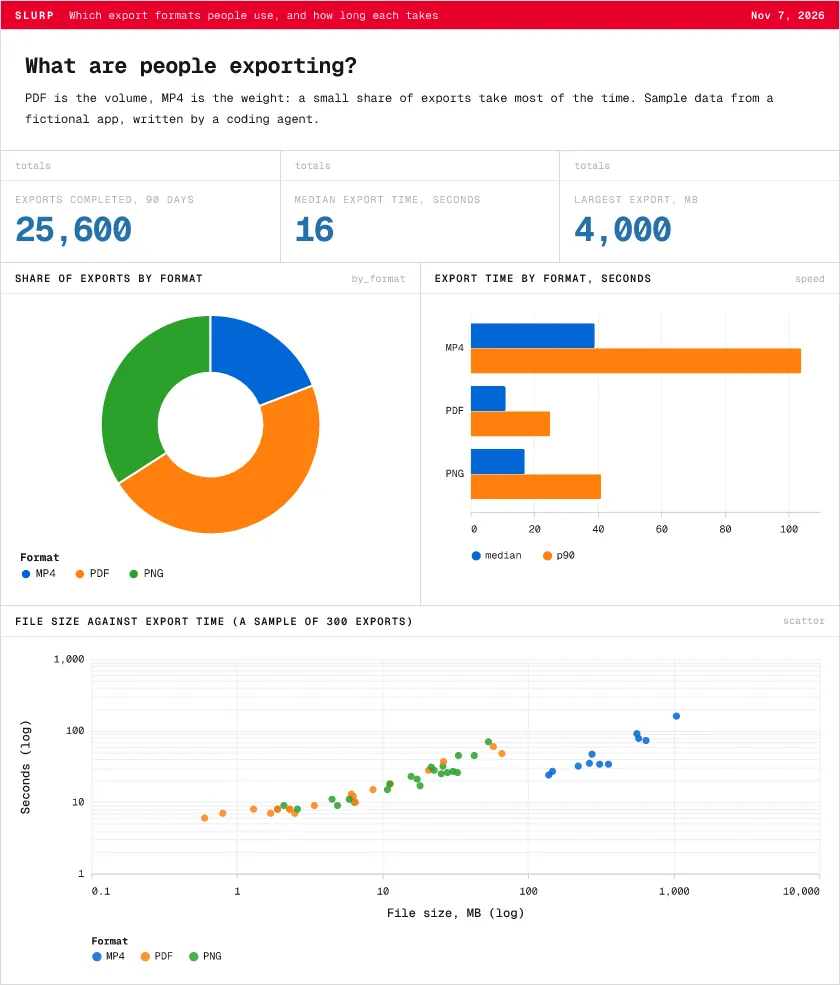 What are people exporting?Donut, bars, scatter
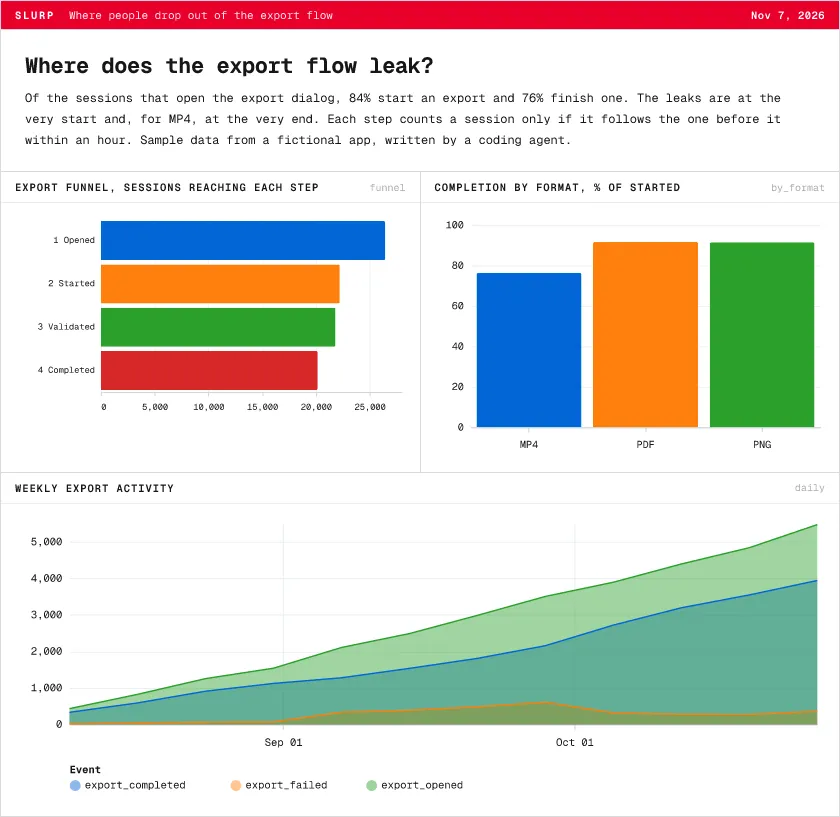 Where does the flow leak?Funnel, bars, area
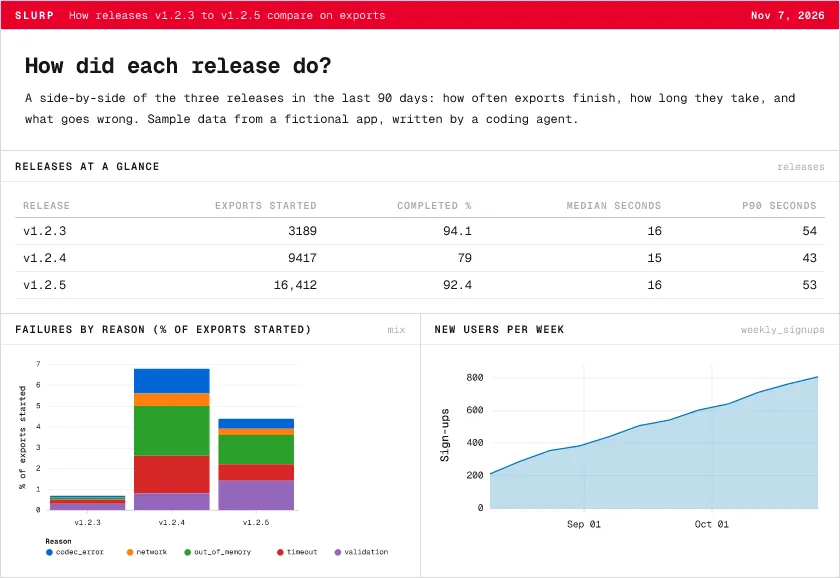 How did each release do?Stacked bars, area, table
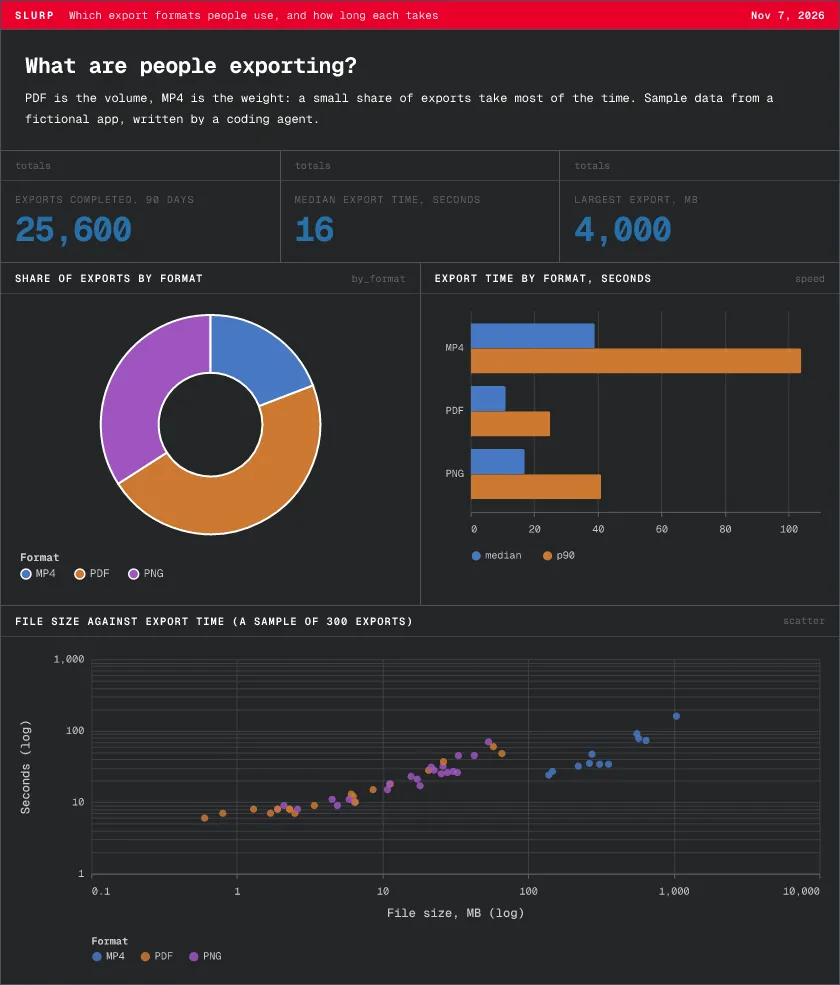 The same report, Pro DarkAny Perspective theme
Sample data from a fictional app, generated by examples/demo and loaded through a real Worker. Nothing here is customer data.
Your agent writes the report in Markdown.
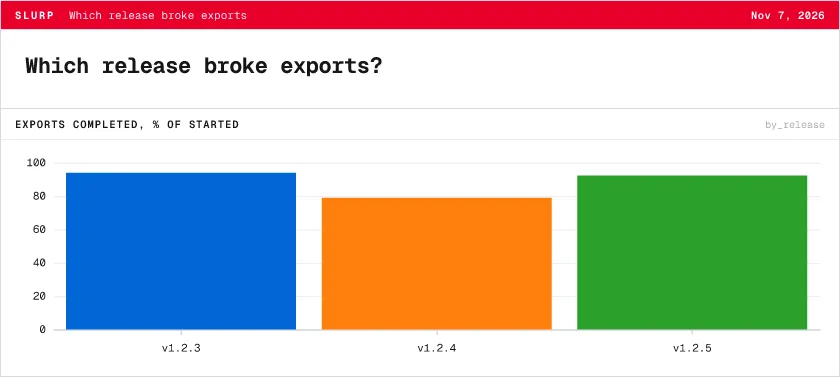
A report is a Markdown file with named SQL and a few blocks. The query stays with the finding, so every number can be reproduced. This is the whole source of the chart beside it.
---
purpose: Which release broke exports
---

# Which release broke exports?

```sql by_release
SELECT
  context->>'$.app.version' AS release,
  round(100.0 * count(*) FILTER (
    WHERE event = 'export_completed'
  ) / count(*) FILTER (
    WHERE event = 'export_started'
  ), 1) AS completed
FROM events
GROUP BY 1
ORDER BY 1
```

```chart
query: by_release
title: Exports completed, % of started
spec:
  height: 170
  mark: bar
  encoding:
    x:
      field: release
      axis: {labelAngle: 0}
      title: null
    y:
      field: completed
      type: quantitative
      title: null
    color:
      field: release
      legend: null
```
slurp report build makes from it- Markdown is the source of truth. Diffable, reviewable, sanitized.
- HTML is the main output. One self-contained file with its charts and fonts.
- PNG and PDF come from the same source. Ready for Slack, email and slides.
- Your agent already knows how.
slurp agent setupinstalls the skill.
slurp report check report.md
slurp report build report.md --out ./report --png --pdf
slurp report open ./reportA few lines. Real events.
A publishable key sends events. Your read key brings them home.
import { init, track, flush } from '@slurp/sdk';

init({
  endpoint: 'YOUR_INGEST_URL',
  sourceId: 'YOUR_SOURCE_ID',
  key: 'YOUR_PUBLISHABLE_KEY',
});

track('signed_up', { plan: 'pro' });
await flush(); // Node: flush before exiting
The SDK is private until published. The quickstart includes installation from source.
Bring more of your stack.
Start with SDK capture, HTTP, and your coding agent. Explore what could come next.
Browser and Node event capture. Install the private SDK from source.
Setup guide ↗Send canonical events as NDJSON to your configured backend.
Setup guide ↗
Payments and subscriptions.

Pushes, pull requests, and releases.

Issues and cycles.

Errors and releases.
Your data. Your machine. Your agent.
DuckDB
Query your local events with SQL. Keep the data you have already synced.
Your coding agent
Install Slurp’s skills for instrumentation, analysis, and product improvement.
Reports
Save SQL and Markdown. Build self-contained HTML, PNG, and PDF output.